What Does an MSP Actually Do? A Plain-English Guide for Business Owners

If you run a small or mid-sized business, you probably rely on technology every day — even if you do not think of yourself as a “tech company.”
Your team may use email, laptops, accounting software, cloud storage, customer databases, online payment tools, Wi-Fi, printers, video calls, shared files, mobile devices, and industry-specific applications. When everything works, technology helps your business move faster. When it does not, it can slow down sales, frustrate employees, affect customers, and create security risks.
That is where an MSP comes in.
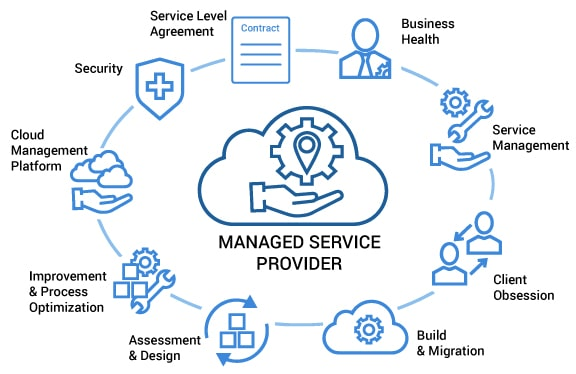
MSP stands for managed service provider. In simple terms, an MSP is an outsourced IT partner that helps monitor, manage, support, and plan your company’s technology. Instead of waiting for something to break and then calling for help, an MSP takes a more proactive approach: keeping systems updated, watching for problems, supporting users, improving security, and helping you make better IT decisions over time.
This guide explains what an MSP actually does in plain English, what services are commonly included, what may not be included, and how to know whether your business might benefit from one.
1. What Is an MSP?
A managed service provider, or MSP, is a company that provides ongoing IT support and management for another business.
Think of an MSP as your external IT department—or an extension of your internal IT team if you already have one. The MSP helps keep your computers, networks, software, cloud services, and security tools running properly.
A typical MSP helps with things like:
- Supporting employees when they have IT issues
- Setting up laptops and user accounts
- Monitoring systems for problems
- Installing updates and security patches
- Managing email and cloud platforms
- Checking backups
- Helping protect against cyber threats
- Advising on future technology needs
For many small and mid-sized businesses, hiring a full in-house IT team may not be practical. You may not need a full-time network engineer, cybersecurity specialist, cloud administrator, and help desk technician on payroll. An MSP gives you access to a range of IT skills without having to hire every role internally.
MSP vs. Break/Fix IT Support
To understand MSPs, it helps to compare them with traditional “break/fix” IT support.
Break/fix support means you call an IT technician when something breaks. For example:
- The internet is down.
- A laptop will not start.
- Email is not sending.
- A printer has stopped working.
- A server has crashed.
The technician then fixes the issue and charges for the time or project.
There is nothing wrong with break/fix support in certain situations. But it is usually reactive. The IT provider becomes involved only after something has gone wrong.
An MSP works differently. Instead of simply responding to problems, an MSP tries to prevent problems where possible. This usually involves ongoing monitoring, regular maintenance, updates, security checks, and planning.
A simple comparison:
Break/Fix IT | Managed Service Provider |
|---|---|
Called when something breaks | Provides ongoing support and monitoring |
Reactive | Proactive |
Costs can be unpredictable | Often based on a monthly service agreement |
Focuses on fixing immediate problems | Focuses on stability, security, and long-term planning |
May not know your business well | Builds ongoing knowledge of your systems and users |
An MSP cannot prevent every technical issue. Computers still fail, software still has bugs, and cyber threats still exist. But a good MSP helps reduce avoidable problems, responds faster when issues happen, and gives your business a clearer IT plan.

2. Day-to-Day IT Support
One of the most visible things an MSP does is help employees with everyday IT problems.
For business owners and managers, this is often one of the biggest benefits. Instead of you, your office manager, or your most “tech-savvy” employee constantly dealing with IT issues, staff can contact the MSP for help.
Help Desk Support
The help desk is the support function employees contact when they need IT help. This may be by email, phone, chat, or a ticketing portal.
Common help desk requests include:
- “I forgot my password.”
- “My laptop is running slowly.”
- “I cannot connect to Wi-Fi.”
- “My email is not working.”
- “I cannot access a shared folder.”
- “My video meeting audio is not working.”
- “I need access to this application.”
A good help desk does more than fix problems. It also documents issues, tracks recurring problems, and helps identify where improvements are needed.
For example, if five employees report that their laptops become slow after a certain software update, the MSP can investigate the bigger pattern instead of treating each case as a separate issue.
Troubleshooting Employee Issues
Troubleshooting means figuring out what is causing a problem and resolving it.
Some issues are simple. Others require investigation. For example, if an employee cannot access a file, the cause could be:
- They are using the wrong password.
- Their account does not have permission.
- Their internet connection is unstable.
- The file was moved or deleted.
- The cloud service is temporarily unavailable.
- Their device has a software problem.
An MSP helps sort through these possibilities and fix the root cause where possible.
This is especially helpful for busy managers. Instead of losing time trying to diagnose technical problems, employees can go directly to the MSP.
Device Setup and Maintenance
When a new employee joins your company, they may need a laptop, email account, business applications, access permissions, security tools, and printer setup.
An MSP can help prepare devices so employees can be productive from day one.
This may include:
- Installing required software
- Setting up email and collaboration tools
- Connecting the device to company systems
- Applying security settings
- Installing antivirus or endpoint protection
- Setting up cloud storage access
- Making sure the device is updated
The MSP can also help maintain devices over time. That includes checking performance, replacing aging hardware, troubleshooting issues, and making sure devices are secure.
For example, if your sales team uses laptops while travelling, the MSP may help ensure each laptop has encryption, security updates, remote support tools, and access to the correct cloud applications.
Software Updates and Patching
Software updates are not just about getting new features. Many updates fix security weaknesses.
A patch is a software update that fixes a known issue, often a security vulnerability. A vulnerability is a weakness that attackers could potentially exploit.
For example, if a common business application has a security flaw, the software vendor may release a patch to fix it. If your systems are not patched, they may remain exposed.
An MSP helps manage updates and patching for:
- Laptops and desktops
- Servers
- Operating systems such as Windows or macOS
- Business applications
- Security tools
- Network devices, depending on the service agreement
This does not mean every update is installed instantly without thought. Some updates need testing or careful scheduling, especially if they could affect business-critical systems. The MSP’s role is to keep systems reasonably current while reducing disruption.
User Account Management
Every employee needs the right level of access to do their job. Not too little, and not too much.
MSPs often help manage user accounts for email, cloud platforms, business applications, and company devices.
This includes:
- Creating accounts for new employees
- Resetting passwords
- Changing access when employees move roles
- Removing access when employees leave
- Setting up multi-factor authentication
- Managing shared mailboxes or distribution lists
- Reviewing permissions
This is more important than many businesses realise.
For example, when an employee leaves, their access should be removed promptly. If old accounts remain active, they can become a security risk. An MSP can help create a proper offboarding process so access is removed consistently.

3. Monitoring and Maintenance
A key difference between an MSP and basic IT support is monitoring.
Monitoring means using tools to keep an eye on your systems, networks, and devices. The goal is to spot problems early—sometimes before employees notice them.
Network and System Monitoring
Your network is what connects your devices, servers, cloud services, printers, Wi-Fi, and internet connection. If the network has problems, work can quickly grind to a halt.
An MSP may monitor things like:
- Internet connectivity
- Server health
- Storage space
- Device performance
- Network equipment
- Security software status
- Backup status
- Unusual system behaviour
For example, if a server is running out of storage space, the MSP may receive an alert and take action before the server crashes or employees lose access to files.
For cloud-based businesses, monitoring may also include cloud services, account activity, and availability of key applications.
Backup Checks
Backups are only useful if they work.
Many businesses assume their data is being backed up, but they never test it. Unfortunately, some only discover backup problems after data has already been lost.
An MSP can help check whether backups are completing successfully. This may include:
- Confirming backup jobs run as scheduled
- Investigating failed backups
- Checking that important data is included
- Testing recovery where appropriate
- Monitoring backup storage capacity
For example, if your accounting files are backed up every night, the MSP can check whether the backup completed. If it failed, they can investigate and fix the issue.
Security Alerts
Security tools often generate alerts when something suspicious happens. But alerts are only helpful if someone reviews and responds to them.
An MSP may monitor security alerts such as:
- Malware detection
- Suspicious login attempts
- Failed login patterns
- Devices missing security updates
- Disabled antivirus protection
- Unusual network activity
Not every alert means there is an emergency. Some are false alarms. But a good MSP helps separate routine alerts from issues that need action.
For example, if an employee account has repeated failed login attempts from another country, the MSP may investigate, reset the password, and strengthen account security.
Preventive Maintenance to Reduce Downtime
Preventive maintenance means taking care of systems before they fail.
This may include:
- Installing updates
- Cleaning up unnecessary files
- Checking device health
- Reviewing system logs
- Replacing aging hardware
- Testing backups
- Reviewing security settings
- Checking network performance
This does not eliminate downtime completely. No IT provider can honestly promise that. But preventive maintenance can reduce avoidable downtime and help problems get resolved faster.
A simple analogy is vehicle maintenance. Servicing your car does not guarantee it will never break down, but it reduces the risk and helps keep it running safely.

4. Cybersecurity Support
Cybersecurity is one of the biggest reasons businesses consider using an MSP.
Small and mid-sized businesses are often targeted because attackers know they may not have large security teams. Cyberattacks can lead to downtime, financial loss, data loss, legal issues, reputational damage, and stress.
An MSP can help reduce risk by putting practical protections in place.
It is important to be clear: no MSP can guarantee complete protection from cyberattacks. Cybersecurity is about reducing risk, improving detection, and responding effectively—not creating a magic shield.
Antivirus and Endpoint Protection
An endpoint is a device that connects to your business systems, such as a laptop, desktop, tablet, or mobile phone.
Endpoint protection is security software that helps detect and block threats on those devices. Traditional antivirus mainly looked for known viruses. Modern endpoint protection may also watch for suspicious behaviour, ransomware activity, and unsafe files.
An MSP can help:
- Install endpoint protection
- Monitor whether it is active
- Respond to alerts
- Keep security software updated
- Remove malware where possible
For example, if an employee accidentally downloads a malicious file, endpoint protection may block it or alert the MSP.
Firewalls
A firewall is a security barrier between networks. It helps control what traffic is allowed in and out.
For a business office, a firewall may sit between your internal network and the internet. It can help block unwanted connections, restrict risky traffic, and support secure remote access.
An MSP may help configure and manage firewalls, including:
- Setting rules for allowed traffic
- Updating firmware
- Monitoring alerts
- Managing secure remote connections
- Reviewing firewall settings as the business changes
A firewall is not enough by itself, but it is an important part of a layered security approach.
Multi-Factor Authentication
Multi-factor authentication, often called MFA, adds an extra step when logging in.
Instead of only entering a password, users must also provide another proof of identity. This might be:
- A code from an authenticator app
- A push notification on a phone
- A hardware security key
- A biometric factor such as fingerprint or facial recognition
MFA is one of the most practical security improvements a business can make. Passwords can be stolen, guessed, reused, or leaked. MFA makes it harder for attackers to access accounts even if they know the password.
An MSP can help set up MFA for systems such as:
- Microsoft 365
- Google Workspace
- VPN or remote access tools
- Cloud applications
- Admin accounts
For example, if an attacker obtains an employee’s email password through a phishing email, MFA may prevent the attacker from logging in.
Security Awareness Training
Technology alone cannot solve every security problem. People are part of cybersecurity too.
Security awareness training helps employees recognise common risks, such as:
- Phishing emails
- Fake invoices
- Suspicious links
- Password reuse
- Unsafe downloads
- Social engineering calls
- Business email compromise scams
Phishing is when attackers pretend to be someone trustworthy, often by email or text message, to trick people into giving away information or clicking a harmful link.
An MSP may provide or recommend training that teaches employees what to watch for and how to report suspicious activity.
For example, an employee in finance might receive an urgent email that appears to come from the CEO requesting a bank transfer. Training can help them pause, verify the request through another channel, and avoid a costly mistake.
Reducing Risk Without Overpromising
A responsible MSP will not say, “We guarantee you will never be hacked.” That would be unrealistic.
Instead, an MSP should help your business:
- Put basic protections in place
- Keep systems updated
- Monitor for suspicious activity
- Back up important data
- Improve employee awareness
- Respond quickly when something goes wrong
- Plan for recovery
Cybersecurity is an ongoing process, not a one-time project.

5. Backup and Disaster Recovery
Every business should ask a simple question:
“If our data disappeared tomorrow, how would we recover?”
Data loss can happen in many ways:
- A laptop is lost or stolen.
- A server fails.
- Someone accidentally deletes files.
- Ransomware encrypts data.
- A cloud account is compromised.
- A system update goes wrong.
- A natural disaster damages equipment.
An MSP helps businesses prepare for these situations through backup and disaster recovery planning.
Data Backups
A backup is a copy of your data stored separately from the original.
Backups may include:
- Files and folders
- Databases
- Server data
- Cloud application data
- Business-critical documents
The right backup approach depends on your business. Some data changes constantly and needs frequent backup. Other data may only need daily or weekly backup.
An MSP can help decide:
- What should be backed up
- How often backups should run
- Where backups should be stored
- How long backups should be kept
- Who can access backups
- How backups should be protected
It is important to understand that cloud services do not always replace backups. For example, Microsoft 365 and Google Workspace have built-in protections, but businesses may still need separate backup solutions depending on their recovery needs and risk tolerance.
Recovery Planning
A backup is only half the story. You also need a recovery plan.
Recovery means restoring data or systems after a failure, deletion, or attack.
An MSP can help answer practical questions such as:
- How quickly do we need to restore key systems?
- Which systems must come back first?
- Who makes decisions during an incident?
- Where are backup credentials stored?
- How do employees work if the office network is down?
- How often should recovery be tested?
For example, if your customer database becomes unavailable, your recovery plan should define whether the goal is to restore it within one hour, four hours, or the next business day. Those different goals may require different tools and budgets.
Business Continuity
Business continuity means keeping essential business operations running during and after a disruption.
This is broader than IT. It includes people, processes, communication, customers, suppliers, and operations.
An MSP supports business continuity by helping with the technology side, such as:
- Restoring systems after hardware failure
- Recovering data after accidental deletion
- Helping staff work remotely if the office is unavailable
- Rebuilding systems after cyber incidents
- Providing access to cloud-based tools
- Advising on backup internet or failover options
For example, if your office internet fails, a continuity plan might include a backup mobile connection or a process for key staff to work from home temporarily.
Again, the goal is not to promise that nothing bad will ever happen. The goal is to reduce the impact when something does.

6. Cloud and Software Management
Many businesses now run partly or fully in the cloud.
The cloud simply means using computing services over the internet instead of running everything on equipment in your office. Examples include Microsoft 365, Google Workspace, Dropbox, Xero, QuickBooks Online, Salesforce, and many industry-specific tools.
Cloud services can be powerful and flexible, but they still need management.
Microsoft 365 and Google Workspace
Microsoft 365 and Google Workspace are common platforms for email, calendars, file storage, video meetings, and collaboration.
An MSP can help with:
- Setting up users
- Managing email accounts
- Configuring security settings
- Managing shared mailboxes
- Setting up Teams, SharePoint, OneDrive, Google Drive, or shared drives
- Helping employees with access problems
- Managing MFA
- Reviewing admin permissions
- Supporting migrations from older systems
For example, if your company is moving from an old email server to Microsoft 365, an MSP can plan the migration, move mailboxes, configure devices, and help employees adjust.
Cloud Storage
Cloud storage lets employees access files from different locations and devices. This can be useful for remote and hybrid teams.
But without proper setup, cloud storage can become messy or risky.
Common problems include:
- Files stored in personal accounts
- Too many people having access to sensitive folders
- Confusing folder structures
- Lack of backup
- Employees sharing links publicly by mistake
- No clear process when staff leave
An MSP can help structure cloud storage so it is easier and safer to use.
Business Applications
Most businesses depend on software applications. These may include:
- Accounting software
- Customer relationship management systems
- Inventory systems
- Point-of-sale systems
- HR tools
- Project management tools
- Industry-specific platforms
An MSP may not be the expert in every application, especially highly specialised software, but they can often help with installation, access, troubleshooting, integration basics, and vendor coordination.
For example, if your accounting software vendor says the issue is “your network,” and your internet provider says the issue is “the software,” the MSP can help investigate and coordinate between parties.
Licensing and Access Management
Software licensing can become confusing as your business grows.
You may be paying for:
- Employees who have left
- Duplicate tools
- Licences with features you do not use
- Wrong licence levels
- Unapproved software subscriptions
An MSP can help manage software licences and access so you know who has what, what you are paying for, and whether it still fits your needs.
This can also improve security. If former employees still have access to business applications, that is a risk. Proper licence and access management helps close that gap.

7. Long-Term IT Planning
A good MSP should not only fix today’s problems. It should also help you plan for tomorrow.
This is where the MSP becomes more of a strategic partner.
Technology Roadmaps
A technology roadmap is a practical plan for where your IT systems are going over time.
It may cover:
- Which devices need replacing
- Which systems should move to the cloud
- Which security improvements should be prioritised
- Which software tools should be standardised
- Which projects should happen this year versus next year
- How IT should support business growth
For example, if your business plans to open a second office, the MSP can help plan networking, internet, Wi-Fi, phones, devices, security, and cloud access before the move happens.
Without a roadmap, IT decisions can become reactive and rushed. With a roadmap, you can plan upgrades, budgets, and changes more calmly.
Budget Planning
IT costs can be unpredictable when there is no plan.
One month everything is fine. The next month you need emergency laptop replacements, server repairs, software renewals, and cybersecurity improvements all at once.
An MSP can help forecast IT spending by identifying upcoming needs such as:
- Hardware replacement
- Software renewals
- Cloud licence changes
- Security upgrades
- Backup improvements
- Network equipment updates
- Support requirements for new employees
This helps business owners avoid surprises and make better financial decisions.
Hardware and Software Lifecycle Management
All technology has a lifecycle.
Laptops get old. Servers reach end of support. Software versions become outdated. Firewalls need replacement. Operating systems eventually stop receiving security updates.
An MSP tracks these lifecycle issues and advises when replacements or upgrades are needed.
For example, using an unsupported operating system may create security and compatibility risks. An MSP can identify affected devices and plan a replacement schedule before it becomes urgent.
Lifecycle management does not mean replacing everything immediately. It means making informed decisions and avoiding last-minute emergencies.
Scaling IT as the Business Grows
A five-person company has different IT needs from a 50-person company. A 50-person company has different needs from a 200-person company.
As your business grows, your technology should become more structured.
An MSP can advise on:
- Standardising devices
- Improving onboarding and offboarding
- Upgrading internet and Wi-Fi
- Strengthening security
- Moving to better cloud platforms
- Setting up role-based access
- Creating IT policies
- Supporting remote or hybrid work
- Improving backup and recovery
For example, a small business may start by sharing passwords informally. That may seem convenient at first, but it becomes risky and unmanageable as the team grows. An MSP can help introduce password management, MFA, and proper user accounts.
The aim is to help IT support growth instead of becoming a bottleneck.

8. What an MSP Typically Does Not Do
It is also important to understand what an MSP may not do.
Services vary by provider and contract. One MSP may include services that another treats as an extra project. Always read the service agreement carefully and ask questions.
Custom Software Development
Most MSPs do not build custom software applications unless they specifically offer development services.
For example, if you want a custom mobile app, a bespoke customer portal, or a specialised internal workflow system, that may require a software development company rather than a standard MSP.
Some MSPs can help manage the infrastructure, hosting, security, or vendor coordination for custom software, but they may not write the code themselves.
Advanced Compliance Consulting
Some industries have strict compliance requirements, such as healthcare, finance, legal, government contracting, or organisations handling sensitive personal data.
An MSP may help with technical controls such as access management, logging, encryption, backups, and security policies. However, advanced compliance work may require specialist consultants, legal advice, auditors, or industry experts.
For example, meeting a specific regulatory framework may involve documentation, risk assessments, staff training, audits, legal interpretation, and formal governance—not just IT configuration.
Some MSPs do offer compliance services, but it should be clearly stated in the agreement.
Specialised Industry Systems
Many businesses use specialised systems, such as:
- Manufacturing control systems
- Medical practice systems
- Legal case management platforms
- Hotel management systems
- Retail point-of-sale platforms
- Warehouse management systems
- Engineering or design software
An MSP may be able to support the device, network, user access, backups, and general troubleshooting around these systems. But deep expertise may remain with the software vendor or a specialist consultant.
For example, if your point-of-sale system has a database error, the MSP may help gather logs and coordinate with the vendor, but the vendor may need to fix the application itself.
Major Projects May Be Separate
Some work may fall outside normal monthly support and be quoted separately, such as:
- Office moves
- Large cloud migrations
- Server replacements
- Network redesigns
- Cybersecurity assessments
- Disaster recovery projects
- New office setup
- Major software rollouts
This is not necessarily a problem. It just needs to be clear.
A good MSP should explain what is included, what is not included, what costs extra, and what response times you can expect.

9. How to Know If Your Business Needs an MSP
Not every business needs the same level of IT support. A very small business with simple technology may only need occasional help. But as your business grows, IT problems can become more frequent, more costly, and more risky.
Here are common signs that an MSP may be worth considering.
You Have Recurring IT Issues
If your team keeps dealing with the same problems, something deeper may need attention.
Examples include:
- Wi-Fi keeps dropping
- Computers are often slow
- Email problems happen regularly
- Printers constantly stop working
- Files are hard to find
- Software crashes often
- Employees complain about access problems
Recurring issues waste time and frustrate employees. An MSP can look for patterns and fix root causes where possible.
Security Concerns Are Growing
If you are worried about ransomware, phishing, data loss, or unauthorised access, an MSP can help strengthen your security basics.
This is especially important if:
- Employees work remotely
- Staff use personal devices
- Passwords are reused
- MFA is not enabled
- Backups are untested
- Former employees may still have access
- Security updates are inconsistent
You do not need to become a cybersecurity expert yourself. But you do need someone responsible for managing the risks.
You Have Limited Internal IT Capacity
Many small businesses rely on one person who “knows computers.” That person may be the operations manager, finance manager, office administrator, or even the owner.
This can work for a while, but it creates problems:
- IT takes time away from their main job.
- They may not have specialist knowledge.
- Problems may be handled inconsistently.
- There may be no cover when they are away.
- Security tasks may be missed.
An MSP gives your team access to broader IT skills and support capacity.
You Have Remote or Hybrid Teams
Remote and hybrid work can increase IT complexity.
Employees may need secure access from home, shared files, video conferencing, cloud applications, and support across different locations.
An MSP can help with:
- Secure remote access
- Device management
- MFA
- Cloud collaboration tools
- Remote troubleshooting
- Endpoint protection
- User access controls
For example, if an employee working from home cannot access company files, the MSP can help troubleshoot without needing to physically visit.
IT Costs Feel Unpredictable
If IT spending only happens during emergencies, costs can feel random and stressful.
An MSP can help make IT more predictable through monthly support agreements, planned maintenance, lifecycle tracking, and budget forecasting.
This does not mean IT will never involve unexpected costs. Hardware can still fail, and business needs can change. But a managed approach usually gives you better visibility and fewer surprises.
You Are Growing and Need More Structure
Growth is a good problem, but it can expose weak IT processes.
Maybe you are hiring more staff, opening new locations, adding cloud tools, handling more customer data, or expanding into new markets.
An MSP can help create structure around:
- Onboarding
- Offboarding
- Device standards
- Security settings
- File access
- Software licences
- Backup policies
- IT documentation
This helps your business scale without creating avoidable risk.

Practical Example: Before and After Using an MSP
Imagine a 35-person company with no dedicated IT staff.
Before working with an MSP:
- Employees ask the office manager for IT help.
- Laptops are bought whenever someone needs one, with no standard setup.
- Passwords are reset informally.
- Some former employees still have access to old accounts.
- Backups exist, but no one checks them.
- Software updates happen randomly.
- The Wi-Fi is unreliable.
- The owner only hears about IT when something breaks.
After working with an MSP:
- Employees contact a help desk for support.
- New laptops are set up with standard security tools and software.
- User accounts are created and removed through a defined process.
- MFA is enabled for key systems.
- Backups are monitored.
- Updates are managed.
- The network is reviewed and improved.
- The owner receives regular recommendations and budget guidance.
The business still has occasional IT problems. But issues are handled more consistently, security is stronger, and leadership has a clearer picture of what needs attention.

Questions to Ask Before Choosing an MSP
If you are considering an MSP, here are useful questions to ask:
- What services are included in the monthly fee?
Ask for a clear list. - What is not included?
This helps avoid surprises. - How do employees request support?
Phone, email, portal, chat, or all of the above? - What response times do you offer?
Understand how urgent and non-urgent issues are handled. - Do you provide remote and on-site support?
Some issues can be fixed remotely; others may require a visit. - How do you handle cybersecurity?
Ask about MFA, endpoint protection, patching, backups, and awareness training. - How do you manage backups and recovery?
Make sure recovery is discussed, not just backup. - Will you help with IT planning and budgeting?
A proactive MSP should help you plan ahead. - How do you document our systems?
Documentation helps with consistency and continuity. - How do you price your services?
Look for transparency and clarity.
The right MSP should be willing to explain things in plain language, not hide behind technical jargon.

Conclusion: An MSP Helps You Run IT More Proactively
An MSP is not just someone you call when a computer breaks. At its best, an MSP is a proactive IT partner that helps your business monitor, manage, support, secure, and plan its technology.
For small and mid-sized business owners, that can mean fewer distractions, better support for employees, stronger security basics, more reliable backups, clearer IT costs, and smarter long-term decisions.
An MSP will not eliminate every problem, prevent all downtime, or guarantee complete protection from cyberattacks. No honest provider should promise that. But a good MSP can help reduce risk, improve reliability, and give you the confidence that your technology is being looked after by people who understand it.
If your business is growing, dealing with recurring IT issues, worried about cybersecurity, supporting remote workers, or struggling with unpredictable IT costs, it may be time to consider whether an MSP could help you operate more smoothly, securely, and strategically.