Cybersecurity on a Fixed Budget: How Singapore SMEs Can Prioritise Controls That Actually Reduce Risk
Running an SME in Singapore is hard enough without worrying about hackers, ransomware, or fake invoices. Yet most cyber attacks today target small and mid‑sized businesses, not just large enterprises. The good news: you do not need a huge IT team or expensive tools to meaningfully reduce your risk.
With a fixed budget, your goal is simple: spend each dollar where it removes the most risk.
This article walks you through:
- A simple way to understand your key assets
- How to rank your biggest, most realistic threats
- A shortlist of high‑impact, low‑cost controls
- How a fee‑only, vendor‑neutral partner can help
- A practical “first 90 days” action plan

1. Why Cybersecurity Matters for Singapore SMEs on a Fixed Budget
For many Singapore SMEs, a cyber incident is not just an IT issue – it’s a business survival issue:
- A ransomware attack can halt operations for days.
- A hacked email account can lead to fake payment instructions and large financial losses.
- A lost laptop with unencrypted customer data can trigger reputational damage and regulatory scrutiny (e.g., Singapore’s PDPA).
At the same time, you probably have:
- A small or part‑time IT team
- Staff using multiple cloud services (accounting, HR, CRM, file sharing)
- Limited budget for “extra” security tools
You cannot protect everything perfectly. But you can:
- Focus on your most critical systems and data
- Address the most common attacks that hit Singapore SMEs (phishing, ransomware, business email compromise, lost devices, staff mistakes)
- Use a short list of sensible controls that are proven to reduce risk
This is also the philosophy behind well‑known security frameworks (like the NIST Cybersecurity Framework or the CIS Controls): know what matters, know what can go wrong, then pick the most effective protections first.

2. Understand Your Key Assets and Business Processes
Cybersecurity should start with your business, not with tools.
2.1 List Your Critical Assets
Spend 30–60 minutes with your management team and ask:
“If this went down or was stolen, how badly would it hurt us?”
Typical critical assets for Singapore SMEs include:
- Email and collaboration – company email accounts, shared drives, chat tools
- Accounting and finance systems – cloud accounting, invoicing, payroll, bank portals
- Customer data – CRM, membership systems, patient/parent/student records, order histories
- Operational systems – booking platforms, POS systems, inventory systems, production systems
- Key documents – contracts, HR files, project files, proposals, designs, IP
Write these down in a simple table with three columns:
- Asset / System
- What it’s used for
- What would happen if it was unavailable or leaked (e.g., “can’t invoice”, “lose customer trust”, “breach of confidentiality”)
2.2 Map to Business Processes
Next, link assets to real‑world processes. For example:
- “From quotation to payment” → email, CRM, accounting software, bank portal
- “Hiring and onboarding staff” → HR files, email, file storage, HR system
- “Fulfilling customer orders” → POS, inventory system, logistics portal
This helps you see where a single cyber incident could disrupt an entire process, not just a single app.

3. Rank Your Biggest, Most Realistic Threats
Once you know what matters, ask: what could realistically go wrong?
3.1 Common Threats for Singapore SMEs
Start with a short list of practical, non‑technical threats:
- Phishing – staff receive fake emails or messages that steal passwords or trick them into clicking malicious links.
- Ransomware – malware that encrypts your files and demands payment.
- Business Email Compromise (BEC) – attackers take over or spoof a business email account to send fake invoices, change bank details, or trick staff into urgent payments.
- Lost or stolen devices – laptops, tablets, or phones with company data get lost in taxis, cafes, or overseas trips.
- Insider error – staff accidentally send data to the wrong person, delete critical files, or misconfigure a system.
- Weak passwords / shared accounts – multiple staff using the same login; easy‑to‑guess passwords reused across systems.
You don’t need a long list. Pick 5–10 that feel realistic for your business. For a current view of attacker tactics hitting local businesses, see our overview of the top cybersecurity threats facing Singapore SMEs in 2025.
3.2 Estimate Likelihood and Impact (Simple “Low / Medium / High”)
For each threat, ask two questions in plain language:
- How likely is this to happen in the next 12–24 months?
- Low / Medium / High
- Use your gut feel and any past incidents (e.g., “we see phishing emails every week” → Likelihood = High)
- If it happened to one of our critical assets, how bad would it be?
- Low: Annoying but manageable (short downtime, minor data)
- Medium: Disruptive, some financial loss or customer impact
- High: Serious operational stoppage, large losses, significant customer or regulatory impact
Then, for each threat + asset combination, roughly rate risk:
- High Risk – Likelihood = High and Impact = High
- Medium Risk – Mix of Medium/High
- Low Risk – Likelihood and Impact mostly Low
You can keep this simple in a spreadsheet:
Asset / Process | Threat | Likelihood | Impact | Overall Risk |
|---|---|---|---|---|
Email accounts | Phishing / BEC | High | High | High |
Accounting software | Ransomware | Medium | High | High |
Laptops (sales team) | Lost / stolen device | Medium | Medium | Medium |
File storage (cloud) | Insider error (deletion) | Medium | Medium | Medium |
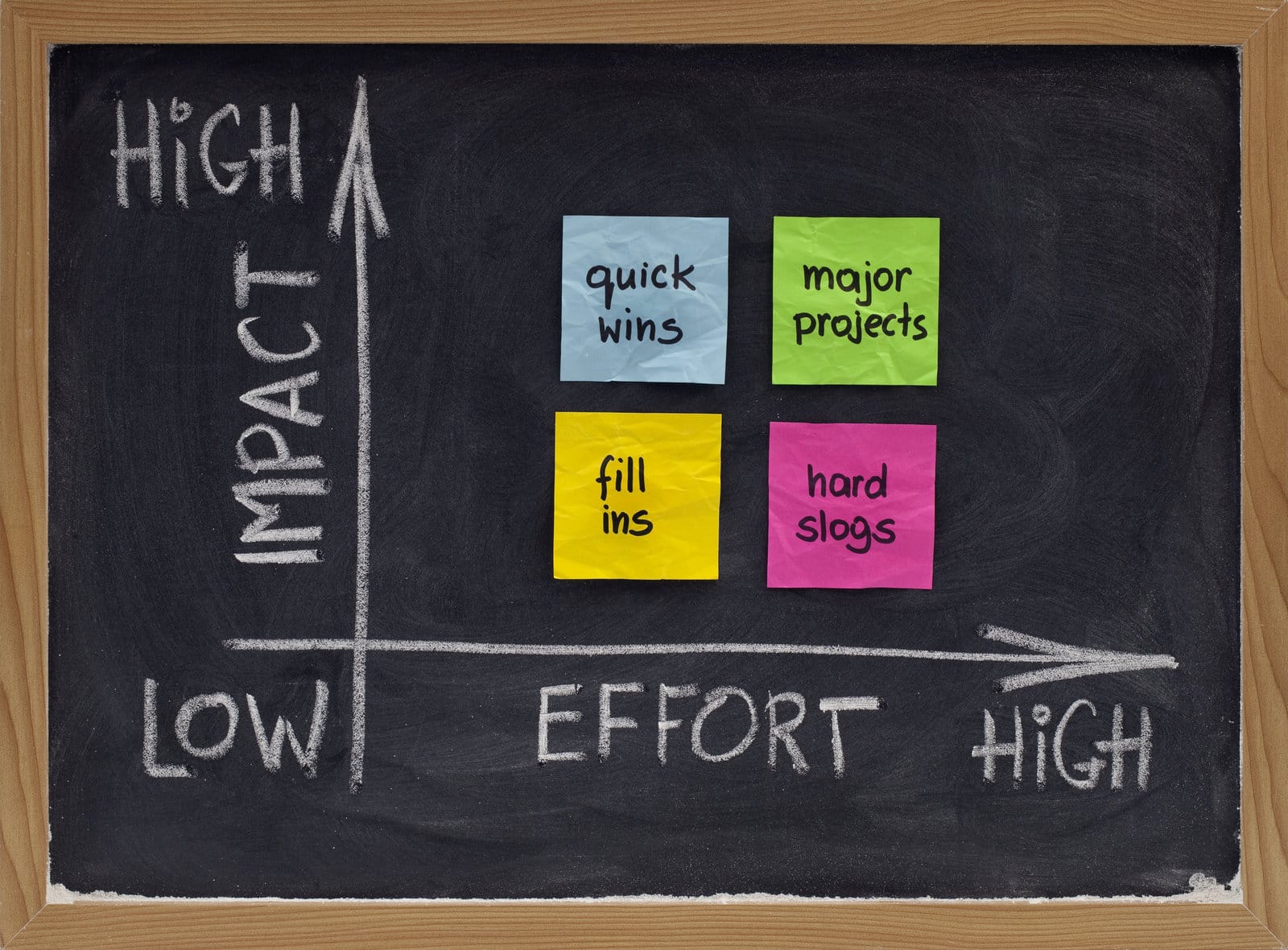
Your top risks are the rows with “High” overall risk. Focus your limited budget on controls that reduce these first.
4. Map High‑Impact, Low‑Cost Controls to Those Threats
Now that you know your top risks, you can select a small set of high‑impact, low‑cost controls. These are the “80/20” measures that most frameworks recommend for SMEs.
Below is a prioritised list, with each control explained in simple terms.
4.1 Strong Passwords + Password Manager + Multi‑Factor Authentication (MFA)
What it is:
Require long, unique passwords for all key systems; use a password manager so staff don’t have to remember everything; and turn on MFA (a one‑time code or app prompt) for logins, especially email, accounting, and cloud apps.
Which threats it helps:
Phishing, account takeover, business email compromise, attackers using leaked passwords.
Why it’s high impact:
Stolen passwords are behind many SME breaches. Strong, unique passwords plus MFA make it much harder for attackers to break in, even if a password leaks. Many cloud services include MFA at no additional cost.
Priority: Very high – implement MFA on email and finance systems first.
4.2 Regular Software Updates and Patching (Including Cloud Apps)
What it is:
Keep your devices (laptops, servers, phones) and key software (operating systems, browsers, office tools) up to date; make sure you apply security updates promptly and enable automatic updates where possible.
Which threats it helps:
Ransomware, malware infections, remote hacking of outdated systems.
Why it’s high impact:
Many attacks exploit known, old vulnerabilities that have available fixes. Regular patching closes these doors at very low cost, especially if you standardise devices and use automated tools.
Priority: Very high – set a policy (e.g., all critical updates within 14 days).
4.3 Basic Email Security Hygiene and Phishing‑Awareness Training
What it is:
Teach staff how to spot suspicious emails (unexpected attachments, urgent payment requests, changes to bank details); use simple email security settings or filters to block obvious spam and dangerous attachments, and implement SPF, DKIM and DMARC for your domain.
Which threats it helps:
Phishing, ransomware, business email compromise, credential theft.
Why it’s high impact:
Most attacks start with a malicious email. A few short training sessions per year and basic email filtering can significantly reduce successful attacks without large spend.
Priority: Very high – especially for finance, HR, and leadership teams.
4.4 Endpoint Protection (Antivirus / EDR for SMEs)
What it is:
Lightweight security software on each laptop and server that scans for malware, suspicious behaviour, and known threats.
Which threats it helps:
Ransomware, malware, some phishing payloads, harmful downloads.
Why it’s high impact:
It provides a safety net if someone clicks something they shouldn’t. Many SME‑friendly solutions are affordable and manageable without a large IT team.
Priority: High – ensure all company‑owned devices are covered.
4.5 Regular, Tested Backups (Including Cloud Systems)
What it is:
Automatic copies of your critical data (files, databases, configurations) stored separately from your main systems; periodically test restoring from backups to make sure they work. If you’re deciding between on‑prem, cloud and hybrid approaches, compare options in our guide to SME backup solutions.
Which threats it helps:
Ransomware, accidental deletion, system failures, insider error.
Why it’s high impact:
Backups turn a potential disaster into a recovery exercise. If ransomware hits or data is deleted, you can restore without paying criminals. Don’t forget cloud systems – many allow exporting or backing up data to a different location or service.
Priority: High – start with finance, customer, and operational data.
4.6 Simple Access Control and Least‑Privilege Practices
What it is:
Give each user only the access they need to do their job (and no more); avoid shared accounts; remove access promptly when staff leave or change roles.
Which threats it helps:
Insider error, insider misuse, damage from compromised accounts.
Why it’s high impact:
If an account is hacked, limited access means limited damage. This is a policy and process change more than a technology purchase, so it’s cost‑effective. This aligns with Zero Trust security principles that limit blast radius.
Priority: Medium to high – do this gradually, starting with finance and admin rights.
4.7 Device Encryption for Laptops and Mobiles
What it is:
Turn on built‑in encryption so that if a laptop or phone is lost or stolen, the data on it cannot be easily read without the password.
Which threats it helps:
Lost or stolen devices, data leaks involving portable devices.
Why it’s high impact:
Loss or theft of devices is common, especially for sales and management staff who travel. Encryption is often already included in modern operating systems and just needs to be configured properly.
Priority: Medium – especially for devices with customer or HR data.
4.8 Clear Incident‑Response Basics (Who to Call, What to Do First)
What it is:
A short, written plan that says:
- How to recognise a potential incident (e.g., suspicious emails, system behaving strangely, files suddenly encrypted)
- Who staff should contact immediately
- Initial steps (e.g., disconnect from the network, don’t pay any ransom, capture screenshots, call your IT support)
- For a step‑by‑step playbook in the heat of the moment, follow our first 24 hours incident response guide.
Which threats it helps:
Almost all – phishing, ransomware, data leaks, lost devices.
Why it’s high impact:
In a crisis, confusion wastes time and increases damage. A simple, one‑page plan reduces panic and speeds up response. It costs almost nothing to create.
Priority: High – especially if you rely on external IT support.

5. How a Fee‑Only, Vendor‑Neutral Partner Can Help
Many SMEs rely on IT partners or managed service providers (MSPs) because they don’t have in‑house expertise. That’s sensible – but not all partners have the same incentives.
A fee‑only, vendor‑agnostic partner focuses on your risk, not on selling specific products:
- They are not paid commissions by vendors for pushing certain tools, so they can objectively recommend what you truly need.
- They remain vendor‑agnostic, meaning they are not tied to a small group of preferred products and can choose options that best fit your business and budget.
- This reduces your total cost of ownership and risk of getting locked into expensive solutions that are hard to change later.
- Because their revenue comes from transparent service fees, they are motivated to help you avoid over‑spending on low‑value tools and “shiny” features you don’t need.
In practice, a good fee‑only, vendor‑neutral partner can:
- Facilitate your asset and risk workshop – helping you list assets, threats, and rank risks.
- Translate frameworks (like NIST or CIS) into a short, practical roadmap suited to your size and sector.
- Select solution types (e.g., “cloud‑based email security filter”, “SME‑friendly endpoint protection”, “backup service”) that balance cost and benefit, without pushing a particular brand.
- Monitor your systems and keep things patched and backed up on a predictable, fixed‑fee basis.
This objective approach builds trust and gives you the freedom to adjust solutions as your business evolves.

6. Simple Checklist: Your First 90 Days Action Plan
You don’t need to do everything at once. Here is a practical 90‑day plan you can adapt.
Days 1–30: Understand and Stabilise
- List your critical assets and processes
- Use the simple table: assets, purpose, impact of loss.
- Focus on email, finance, customer data, operations.
- Identify top threats and rank risks
- Pick 5–10 realistic threats (phishing, ransomware, BEC, lost devices, insider error).
- Rate likelihood and impact as Low / Medium / High.
- Enable MFA on key systems
- Start with email, accounting/finance, and any admin portals.
- Communicate clearly to staff; provide a short guide.
- Check backups exist for critical data
- Confirm what is backed up, how often, and where it’s stored.
- Do at least one basic restore test of a file or mailbox.
- For broader continuity planning, see our SME disaster recovery and business continuity guide.
Days 31–60: Close the Biggest Gaps
- Roll out basic security hygiene and phishing awareness
- Short briefing for all staff (30–45 minutes).
- Share a simple “how to spot a suspicious email” checklist.
- For structure and topics, use this security awareness training guide.
- Improve patching and endpoint protection
- Ensure all company laptops and servers have up‑to‑date antivirus/EDR.
- Turn on automatic updates where possible; set a patching schedule. If you’re moving from break‑fix to scheduled, proactive maintenance, here’s why that shift matters.
- Encrypt laptops and mobiles
- Check if encryption is enabled on devices used outside the office.
- Prioritise devices with access to customer or HR data.
- Define simple access rules
- Identify who has admin access; reduce where unnecessary.
- Stop using shared accounts for finance, HR, or admin tasks.
Days 61–90: Prepare for Incidents and Optimise
- Create a 1–2 page incident‑response guide
- What to look out for
- Who to call (internal lead + external IT/support)
- Initial dos and don’ts
- Engage a fee‑only, vendor‑neutral IT/security partner (if you don’t have one, consider a managed IT service provider for SMEs)
- Ask how they charge (fixed fee vs. commissions).
- Request a simple, 12‑month cybersecurity roadmap prioritised by risk, not tools.
- Review and refine your risk list annually
- Update your asset list as your business and systems change.
- Re‑rank threats if you move more operations to the cloud or open new offices.

Summary and Conclusion
Cybersecurity for Singapore SMEs doesn’t have to be complex or expensive. With a fixed budget, your best strategy is to:
- Understand what matters most – your critical systems and data.
- Identify your top, realistic threats – especially phishing, ransomware, and business email fraud.
- Invest in a short list of high‑impact controls, including:
- MFA and strong passwords with a password manager
- Regular patching and endpoint protection
- Backups that you actually test
- Basic staff awareness and clear incident‑response steps
- Device encryption and sensible access controls
- If you do nothing else this month, start with three actions:
- Turn on MFA for email and finance systems.
- Verify you have reliable backups for critical data, and test a restore.
- Conduct a short phishing‑awareness session with your staff.
From there, build gradually, and consider working with a fee‑only, vendor‑neutral IT partner who can keep your focus on risk reduction rather than product sales. That way, every dollar you spend on cybersecurity genuinely protects your business, your customers, and your reputation.